If your firm already runs on Microsoft 365, you probably have Copilot in front of you right now. It sits in Outlook, Word, Teams and the Edge browser, and many advisors open it for the first time without knowing which version they're using or what happens to what they type.
The good news is that the business version was built for this kind of work. Microsoft says prompts and responses in its business plans aren't used to train the underlying models, and your firm's own permissions and retention settings apply to Copilot the same way they apply to your email.
Here's which Copilot you have, what it costs, where it helps and what to set up before you use it with anything client related.
Can Financial Advisors Use Microsoft Copilot?
Yes, and for many small firms it's the easiest AI tool to start with, because it lives inside software you already pay for and already archive. The key is using it while you're signed in to your firm's work account.
That one detail decides almost everything. Microsoft's enterprise data protection, the set of commitments that covers your prompts and responses, applies to organizations using Copilot through their Microsoft 365 accounts. Microsoft says that protection applies when you sign in with your firm's Microsoft Entra account. Copilot also works with a consumer Microsoft account in Outlook, Teams and Edge, and that version doesn't come with your firm's controls attached.
Which Version of Copilot Do You Actually Have?
There are two you're likely to run into at work, and Microsoft recently renamed both, so the labels you see may not match older articles. Copilot Chat, once called Microsoft 365 Copilot Chat, is the AI assistant Microsoft includes at no additional cost with eligible Microsoft 365 plans. It answers from the web plus whatever you paste, upload or have open, and inside Outlook it can also work with your email, calendar and meetings.
Microsoft Copilot, once called Microsoft 365 Copilot, is the paid add-on. It gives you the full experience in Word, Excel, PowerPoint and OneNote, and it can pull from your email, files, meetings and calendar on its own, limited to what you already have permission to see.

The easy test is to open Copilot and look for the green shield at the top and a Work label under your profile. Those mean you're signed in with your firm's account and enterprise data protection applies. If you don't see them, you may be signed in with a consumer account, and that's the version to keep away from anything about a client.
How Much Does Microsoft Copilot Cost?
Copilot Chat costs nothing extra on eligible Microsoft 365 business plans. For the full version, Microsoft's pricing page, which still uses the older name, lists the Microsoft 365 Copilot Business add-on at $18 per user per month paid yearly, a first-year price that runs through December 31, 2026 before returning to $21, or $25.20 a month without the yearly commitment.
Microsoft also sells bundles. Microsoft 365 Business Standard with Copilot is listed at $23.50 per user per month paid yearly, and Business Premium with Copilot at $32. These business plans cover firms of up to 300 users, and Microsoft offers a one-month free trial.
Prices change, so check Microsoft's Copilot pricing page before you buy. For a solo advisor, the real question is whether the in-app features save you more than an hour or two a month.
What Can Copilot Do Well for an Advisory Practice?
It's strongest at the work that already happens inside Microsoft 365. Microsoft says it can summarize email threads and draft replies in Outlook, summarize and transcribe meetings in Teams, draft and rewrite documents in Word and help with formulas and analysis in Excel.
That makes it a good fit for internal work like recapping a staff meeting, cleaning up a process document or drafting a reply to a vendor. It saves the most time when the source material is already in your email or files.
Like every AI tool, it can be confidently wrong. Treat anything it says about numbers, rules or tax law as a draft to check, and the guide to writing better AI prompts covers how to ask for work you can check quickly.
Is It Safe to Put Client Information Into Copilot?
The business version is far safer than a consumer chatbot, but safe enough depends on your firm's policy. Microsoft says prompts and responses aren't used to train its foundation models, and that Copilot follows your firm's permissions, sensitivity labels and retention policies.
One detail is easy to miss. When Copilot searches the web to answer a question, it sends a short search query to Bing, and Microsoft says those queries are handled under separate terms with user and tenant identifiers removed. Keep names, account numbers and other identifying details out of anything that might trigger a web search.
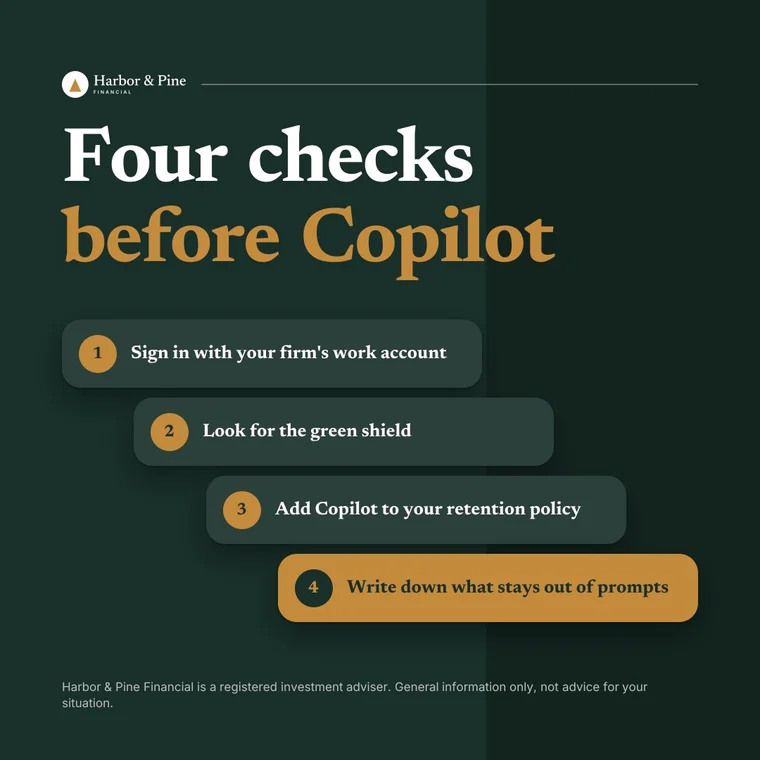
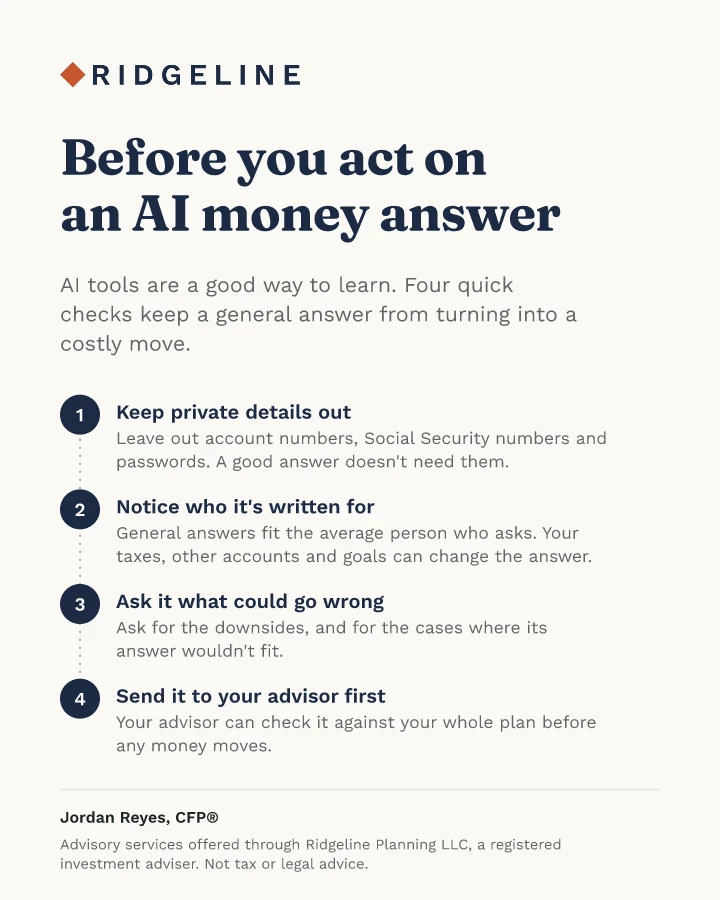
A good default is to keep client names, account numbers and Social Security numbers out of prompts unless your firm has written down that it's allowed. The guide to PII and NPI in AI tools walks through what counts and how to strip it out.
Does Copilot Help With Recordkeeping?
It can, which is one of the better reasons to choose it. Microsoft stores Copilot prompts and responses in a hidden folder in each user's Exchange mailbox, where compliance staff can search them with eDiscovery tools, and Microsoft Purview lets your firm set retention policies that keep or delete them.
It doesn't happen on its own, though. Someone has to create a retention policy that includes Copilot, and Microsoft now lists Copilot as its own location in those policies, separate from Teams chats. If your IT provider set up your retention years ago, ask them to check it covers Copilot too.
Whether a given chat is a record your firm has to keep is a question for your compliance officer. If you're an RIA, your books and records rules may reach AI conversations that touch client advice, and if you're with a broker-dealer, your firm's procedures will say how Copilot fits.
Is Copilot Better Than ChatGPT for Financial Advisors?
It depends on where your work lives. Copilot wins on convenience and archiving for firms already on Microsoft 365, since it reads your email and files and stores its history where compliance can find it.
ChatGPT and Claude tend to be stronger for longer writing and for back-and-forth thinking, and both offer business plans with their own controls. The ChatGPT vs. Claude comparison covers how those two differ, and the guide to using ChatGPT as an advisor covers the setup that keeps it compliant.
Plenty of firms end up using two. Copilot handles the inbox and the meeting recaps, and a second tool handles the writing that needs to sound like you.
Can Copilot Handle Your Marketing?
It can draft a post or an email if you ask, but it doesn't know your voice, your niche or the rules for advisor marketing unless you explain them each time. A LinkedIn post written in Word with Copilot still needs you to decide what to say, rewrite it so it sounds like you and check it against the SEC Marketing Rule or FINRA Rule 2210.
That's a lot of steps for something you want to do every week. It's also why many advisors who try general AI tools for marketing end up with posts that read like everyone else's.
Meet Watt, the marketing agent for financial advisors.
Monthly newsletters, website articles, social posts and graphics, all in your brand and your voice.
Paste your website and Watt learns your brand.

- Your colors
- AaAaYour fonts
- Your logo
- Your voice
Your week of posts, drafted for you.





Your monthly newsletter, written for you.
- Sounds like you
- Links to your website articles
- Your disclosure added
More than 50 client handouts, in your brand.
Nothing goes out until you approve it.
- infPosts to LinkedIn, Facebook, Instagram and X on timeFacebook and Instagram business accounts
 Newsletter ready to sendDrafted in your Mailchimp or Kit
- A copy for your records
About 10 minutes a week
About ten minutes a week. Nothing goes out until you approve it.
Start your 7-day free trialWatt was built for this one job. Paste your website, and it drafts a week of posts, a client email and the graphics in your voice and your brand, checked against SEC Marketing Rule and FINRA 2210 basics. You approve everything, and your firm's own review still decides.
The Bottom Line for Advisors Thinking About Copilot
Microsoft Copilot is a sensible first AI tool for a firm already on Microsoft 365, as long as everyone uses it through their work account. Copilot Chat is included with eligible plans, and the full in-app version is worth a trial if your day runs through Outlook and Teams.
Before anyone uses it for client work, confirm the work account shows enterprise data protection, add Copilot to your retention policy and write down what can and can't go into a prompt. That's an afternoon of setup that makes the rest of the year a lot simpler.

Sam is the founder of Amplify for Advisors and Watt, the Amplify for Advisors Agent. A former RIA owner whose work has been featured in Forbes, NerdWallet, Nasdaq, and more, he teaches financial advisors to use AI in their own voice while staying compliant.